
Important announcement
Welcome to our new support !
We are switching to the central ticket system Zendesk – for a faster, better and more transparent support service!
How to create a ticket step by step:
1
Registration
Sign up at support.ioki.com.
If you have previously been in contact with our support team, we have already created an account for you and registered your email address. In that case, please use the ‘Forgot password’ function to set your own password and log in.
If additional or new employees require access to Zendesk, please contact your account manager – existing accounts will remain unchanged.
Create ticket
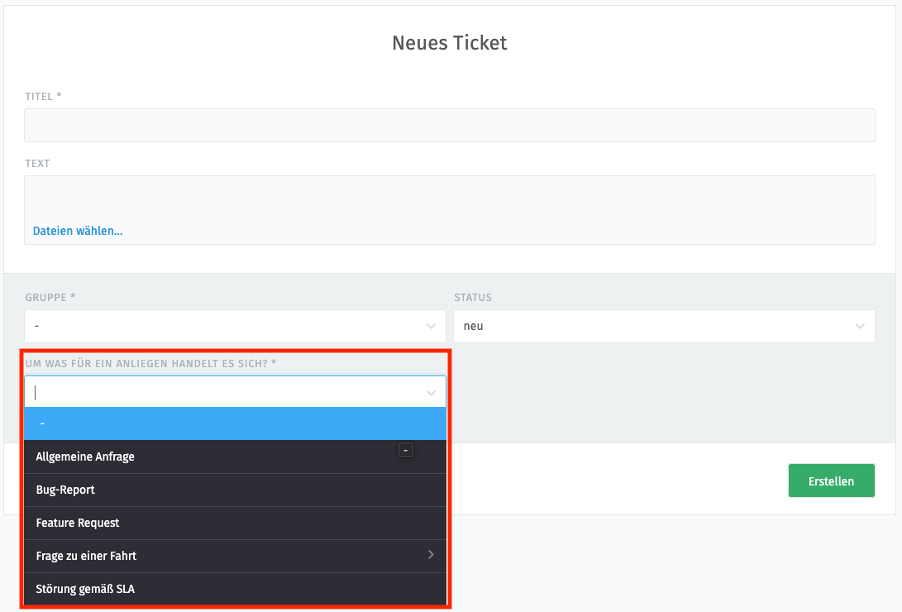
Click on ‘New ticket’ to create a new request. First, select the appropriate category below the text field.
1. Feature request: Suggestion for a new functionality that does not yet exist in the system.
2. Change request: Request for a change to the existing product, i.e. an adjustment or extension of an existing function.
3. Bug report: Report of errors in the product. Please always send additional information with your report, such as ride IDs, user IDs, videos/images/links.
4. Questions about a ride: price calculation, matching, fleet availability.
5. Malfunction according to SLA: Report of significant errors that impede or prevent operation and are covered by the Service Level Agreement. Please check the agreed Service Level Agreement in advance.
Enter all relevant information in the text field so that our team can process your request quickly. Once everything is complete, create the ticket and send it off.
The Product Enablement Team does not respond to the following enquiries:
– Analyses of individual enquiries on matching issues are no longer carried out. For example: A journey was not correctly assigned to a vehicle at your own discretion.
– Complaints from individual users about the ioki Passenger App. For example: A user can no longer log into the ioki Passenger App.
– Creating and editing users and their rights for the ioki Platform.
– Any enquiries about and relating to the developer programme. Users with access have already been provided with separate contacts for this purpose.
Track status
You can log in to Zendesk at any time to view the current status of your ticket. The creator of a ticket automatically receives notifications at the email address on file as soon as something changes. Colleagues who are assigned to the same organisation can also view their team’s tickets. This ensures that every issue remains visible to the entire team and can be processed without delay.
We are here for you!
Create your ticket in Zendesk now and we will take care of your request.
All support requests in one place:
Central entrance
All enquiries are collated in one central location – no more time-consuming searches or lost emails.
Automatic notifications
You will be informed as soon as there is a change in the status of your ticket.
Status overview
You can see the processing status of your ticket at any time.
Simplified ticket creation
Ticket templates for individual topics, such as feature requests or bug reports, simplify the process of creating requests.
Clear division of roles
This tool is used by the Product Enablement Team, which means that support requests are sent exclusively to us. Key Account Managers are informed about ticket requests.
Your Product Enablement Team at ioki
Your central point of contact for all questions regarding our products, feature requests, change requests and technical support.

„I like things to be clear and to work properly – and I enjoy helping when they don’t. Clear communication and reliable solutions are particularly important to me. I bring calmness and patience to the table – preferably with a cup of tea within reach.“

Jessica Gießler
Product Support
„I ensure that your questions are answered in a clear and solution-oriented manner. My goal is to enable you to understand your product optimally so that you can use it to its full potential.“

Teresa Gaete
Product Support
Frequently asked questions
Everything you need to know
FAQ
Do you have questions about the changeover? Here you will find the most important answers at a glance. Can’t find your question? Your ioki Account Manager will be happy to help you.
Access & user accounts
Do I need to re-register with Zendesk?
No. If you have previously been in contact with our support team, we have already registered you with your email address. You can then create a password using the ‘Forgot password’ function and log in. If new employees need access to Zendesk, please contact us and we will send out the appropriate invitations.
How do I set up two-factor authentication (2FA) in Zendesk?
When you log in to Zendesk for the first time, sign in with your email address and password. You will then be automatically guided through the setup of two-factor authentication (2FA).
Important: Save the recovery code displayed securely. You will need it if you lose your device or no longer have access to your authenticator app.
Can colleagues also see and edit tickets that I have created?
Yes, that is possible. Since colleagues in Zendesk are assigned to an organisation, they can view the tickets of their team members – for example, even when someone is on holiday. This means that the issue remains visible to the entire team and can be easily processed in the event of absences.
Do I need to do anything when employees leave the company or no longer need access?
Yes, if employees no longer need access to Zendesk, please contact your ioki Account Manager. We will deactivate the relevant account and take care of all further steps. This ensures that your access remains secure and up to date.
Ticket creation & processing
What happens to existing tickets?
Both existing and new tickets are recorded and visible in Zendesk.
What is the purpose of the ticket number?
Each new request is automatically assigned its own ticket number (e.g. Ticket#12345). This allows for clear differentiation and serves as a reference element, for example when several requests are running in parallel.
Can I add attachments to tickets in Zendesk?
Yes. Screenshots, logs or other files up to 50 MB can be attached directly to the ticket.
Who receives updates on the tickets?
The creator of the ticket automatically receives notifications at their registered email address.
How are incoming tickets categorised and prioritised?
Tickets are evaluated upon receipt in terms of their relevance to operations and categorised accordingly. Incidents that affect ongoing operations are prioritised immediately. In addition, tickets are generally processed chronologically in the order in which they are received.
Can I also address my concern directly to my ioki Account Manager?
No. Your key account manager cannot create tickets on your behalf (or on behalf of your company). However, they can add additional information to an existing ticket if necessary and are informed about their customers’ tickets.
Can my ioki Account Manager speed up the processing of a ticket?
No. Account management has no influence on the processing speed or prioritisation of tickets.
Data protection & security
How does ioki ensure data protection when using Zendesk?
Requests submitted through our support tool are handled in compliance with applicable data protection requirements. A corresponding data processing agreement is in place with the provider.
Where is the data stored?
Personal data collected through the use of this application is stored and processed exclusively within the European Union and/or the European Economic Area (EEA).
What data is processed in Zendesk?
Only the data necessary for processing the support request is processed – typically name, email address and content of the request. No sensitive or personal end customer data is processed.
Who has access to the data?
Only authorised employees in the ioki support team and, if necessary, in technical processing. Access is role-based and is checked regularly.
Our goal: to provide you with fast, transparent and solution-oriented support – so that you can concentrate on your core business.
– Your Product Enablement Team